Kids Numbers and Math
- 4.1
- Rating
- 100.00K
- Installs
- $2.99
- Price
 Analysis by App-foxy
Learning numbers is easy to describe and much harder to make enjoyable for a young child. Kids Numbers and Math takes a focused approach: it turns early number practice into a game rather than asking children to sit through a formal lesson. I found that focus useful because the experience is simple enough for a child to understand quickly, while still giving parents a practical way to introduce counting and basic arithmetic during short sessions.
This is an educational game from Intellijoy Educational Games for Kids, aimed at Everyone. It is available for $2.99, has reached over one hundred thousand installs, and holds an average rating of 4.1 from around one thousand ratings. Those figures suggest a product with a modest but established audience rather than a passing novelty. It was released on March 2, 2010, and the current version is 2.6.1, so its long presence matters when judging it: this is a deliberately focused learning tool, not a large modern game trying to cover every area of childhood education.
How the learning experience feels in everyday use
The best way to use this game is as a short, repeatable activity. A child can open it when there are a few quiet minutes before dinner, during a travel break, or after finishing another task. I would not treat it as a complete mathematics course. Its value is in giving early learners a friendly place to practise number recognition and basic mathematical thinking without turning every exercise into a worksheet.
You May Also Like

 Blood Strike: 2.5 Anniversary
Blood Strike’s Loadouts Turn Every Drop Into a Tactical Gamble
A close look at Blood Strike’s custom loadouts: how fast access to signature weapons reshapes its battle royale rhythm, rewards preparation, and narrows the gap between fights.

 Pandora - Music & Podcasts
Pandora’s Music Is Easy to Start, but Harder to Recover
Pandora’s strength is its low-effort path from a seed to a station. Its weak spot is how much confidence it asks you to place in connection, setup, and quiet recovery.

 8 Ball Pool
8 Ball Pool Is Built on Rivalries, Rematches, and Routine
A close look at the rivalries, rematches, shared routines, and unanswered safety questions that turn a quick pool match into a persistent mobile community.

 Samsung Music
Samsung Music’s Quiet Strength Is Playing What You Already Own
Its reach comes less from spectacle than from dependable access to a personal library. That simplicity is both the app’s strongest retention engine and its ceiling.

 AccuWeather: Weather Radar
AccuWeather Review: A Quick, Clear Forecast for Everyday Decisions
For everyday plans, the best forecast is the one you can understand quickly. AccuWeather makes rain timing, radar, and local conditions easy to act on, with a few trade-offs.

 Hill Climb Racing
Why Hill Climb Racing Still Turns Crashes Into One More Run
A tiny car, a bumpy hill and one more upgrade: Hill Climb Racing keeps resurfacing because its simple chaos makes every near-miss feel personal.
More From Our News Desk
View All News


For a preschool or early-primary learner, the limited scope is actually helpful. Children often become distracted when an educational app piles on reading, stories, rewards, characters, and several unrelated subjects. Here, the subject stays close to numbers and basic math skills. That makes it easier for a parent to say, “Let’s practise counting for a few minutes,” rather than handing over an app with an unclear learning purpose.
The interface is also more suitable for guided use than for unsupervised discovery by a very young child. A child who already understands simple touch interactions may be able to begin independently, but younger learners can still benefit from an adult sitting nearby and turning mistakes into conversation. Instead of immediately correcting an answer, I would ask the child to count the objects again or explain how they reached the result. That small change makes the game more educational than simply tapping until the screen accepts an answer.
One useful routine is to keep sessions short and stop while the child is still comfortable. Repeating the same kind of exercise for too long can make number practice feel like a chore. I would use it for one focused activity, then close it and return later. This is especially useful for children who learn better through frequent repetition than through a long lesson.
Speed expectations for a child-friendly game
Because this is a compact educational title rather than a visually demanding action game, I approach it with modest performance expectations. The important question is not whether it has elaborate animation, but whether a child can move from one activity to the next without confusion or distracting pauses. In this kind of app, perceived speed affects learning: if the response after a tap feels unclear, a child may not know whether the answer was accepted.
The long availability of the game and its current version, 2.6.1, make it reasonable to expect a straightforward experience on compatible devices. Still, I would avoid judging it by the standards of newer, graphics-heavy children’s apps. Its appeal is concentration, not spectacle. A simpler presentation can also be an advantage because it keeps the child’s attention on numbers rather than on decorative effects.
For parents, the practical performance test is simple. Open an activity before giving the device to the child, check that the touch response feels clear, and make sure the child understands what to do next. This takes less than a minute and prevents a small technical hesitation from becoming a learning problem. If the device is older or has many other apps open, restarting it before a practice session is a sensible precaution, even though I would not describe that as a requirement for normal use.
Another point is that children interpret delay differently from adults. An adult may wait patiently for a screen to respond, while a young child may tap repeatedly and accidentally move past an activity. I recommend teaching one simple habit: tap once, then wait for the result. That is both a useful device skill and a way to keep the child’s answers meaningful.
What happens during heavier use
“Heavy use” for this game does not mean a long multiplayer session or a graphically intense level. It means repeated practice, quick tapping, and several activities in one sitting. Those moments are where an educational app can become tiring even when it is technically working well. A child may rush, guess, or lose interest before the mathematics becomes useful.
I found that the best response is to change the learning rhythm rather than push through. After a few rounds, pause and ask the child to show the same idea with physical objects, such as blocks or small toys. For example, if the game presents a simple addition task, the child can build the two groups on the table and count the total. This creates a bridge between screen practice and real-world understanding, and it helps reveal whether the child knows the idea or is merely recognising a familiar pattern.
A second useful workflow is to use the game as a warm-up rather than the entire lesson. A few activities can prepare a child for counting aloud, sorting objects, or writing numbers on paper. In my experience, this is more effective than expecting the app to replace hands-on learning. The screen offers immediate interaction, while physical objects help a child understand quantity and order.
Parents should also watch for accidental tapping. Young children often touch the screen several times when excited, particularly after a correct answer. If the game advances quickly, that can make the child feel that an activity was skipped. Sitting beside the child during the first few sessions helps identify whether the issue is performance, unclear instructions, or simply enthusiastic tapping.
The $2.99 price also affects how I would use it. Since this is a paid game, I would expect it to serve a specific purpose rather than provide an endless entertainment loop. That makes it a better fit for families who want a small number-focused tool than for parents searching for a broad library of changing activities. A paid, focused app can be worthwhile when it becomes part of a regular routine, but it is less compelling if a child quickly loses interest in number practice.
Reliability and recovery after interruptions
Reliability matters more in a children’s app than in many adult tools. If a session ends unexpectedly, a young child may not know how to return to the activity or may assume that the mistake was theirs. I therefore judge recovery by the simplicity of the next step: can the child reopen the game, understand the screen, and continue with help from an adult?
Kids Numbers and Math is best treated as a self-contained practice tool. I would start each session with a clear goal, such as counting carefully or working through a few basic sums, rather than relying on a long progression that must be preserved. This makes interruptions less frustrating. If a child has to stop because dinner is ready or the device is needed for something else, the learning does not depend on reaching a particular point.
For families sharing one device, I recommend closing the game normally when another person needs the phone or tablet. Reopening it before the next child’s session is a simple way to confirm that the app is ready and that the screen is responding as expected. This is especially useful when the device has been used for video, games, or other demanding tasks immediately beforehand.
There is also a human side to recovery. If a child gives several wrong answers, do not frame the next attempt as a test they must pass. Ask them to slow down and count aloud. The game can provide repetition, but the adult supplies reassurance and explanation. That combination is important because a number game should build confidence, not teach a child to fear mistakes.
The developer, Intellijoy Educational Games for Kids, is associated here with a clearly defined educational purpose. The game’s established age rating of Everyone makes it suitable for a broad family audience, although suitability still depends on the child’s developmental stage. A child who is not ready for number symbols may need more spoken counting and physical play before the app becomes genuinely useful.
Device constraints and who should use it
The listed minimum operating-system requirement is 7.1, which gives the game a relatively broad compatibility range for supported devices. I would still check the device before purchasing, particularly if the child will use an older phone or tablet. Compatibility is only the first consideration: screen size, touch accuracy, battery condition, and the general responsiveness of the device all affect how comfortable a young learner will find the experience.
A larger tablet can be more practical than a small phone for children who are still developing fine motor control. Bigger touch targets are easier to press accurately, and an adult can sit beside the child without blocking the screen. A phone is convenient for travel, but its smaller display may encourage rushed tapping or make number groups harder to inspect. This is not a criticism of the game itself; it is a reason to match the device to the child.
I would also avoid using it when the device is nearly out of battery or when the child is already overstimulated by other screen activities. The game is intended to support learning, but it cannot compensate for a poor setting. A quiet place, comfortable brightness, and an adult nearby can make a greater difference than switching between several educational apps.
This game is a good choice for parents who want early number practice, teachers who need a simple supplementary activity, and children who respond well to tapping and immediate feedback. It is less suitable for a child who needs advanced mathematics, detailed explanations of mathematical language, handwriting practice, or a broad curriculum covering reading and science. Older learners may also find the content too basic, even if they enjoy games in general.
Compared with paper worksheets, the main advantage is interaction. The child receives a more immediate response and may be more willing to repeat an activity. Compared with a video lesson, the child has to participate rather than only watch. Compared with large subscription-based learning platforms, this game is narrower and less likely to overwhelm a family looking for one specific skill. The trade-off is that it may not provide the variety, storytelling, progress tracking, or wider subject coverage that some parents expect from a modern learning service.
Three practical ways to get more from the game
My first tip is to ask the child to explain every few answers in their own words. A correct tap does not always prove understanding. If the child can say why a group contains a certain number or how two quantities combine, you have stronger evidence that the activity is teaching rather than merely entertaining.
My second tip is to pair screen practice with a physical follow-up. After a counting activity, place similar objects on the table and ask the child to make a group with the same quantity. After a basic addition activity, let the child combine two small groups and count the result. This workflow exposes a common weakness of screen learning: children can sometimes recognise the expected answer without connecting it to real quantities.
My third tip is to use mistakes diagnostically. If the child repeatedly confuses number order, return to counting aloud. If the child counts correctly but struggles with simple sums, use objects before asking for another screen answer. If the child knows the answer but taps the wrong place, the issue may be motor control rather than mathematics. The app becomes more useful when the adult responds to the type of mistake instead of simply repeating the same round.
A fourth tip is to reserve the game for a predictable moment. A short session after breakfast or before a quiet afternoon activity can work better than offering it whenever the child is bored. A routine gives the game a learning role and reduces the temptation to treat it as unlimited screen entertainment.
My performance verdict and overall recommendation
Kids Numbers and Math succeeds because it keeps its purpose clear. It is a small educational game for children who are beginning to recognise numbers and build basic math skills, and it works best when used in short sessions with an adult’s encouragement. Its age rating of Everyone makes it broadly accessible, while its focused design avoids the distraction of a large all-in-one platform.
I would not choose it as the only mathematics resource in a child’s routine. It does not replace counting real objects, talking through problems, drawing quantities, or practising written numbers. Families wanting a complete curriculum or more advanced challenges should look elsewhere. I would also skip it if the child has already moved well beyond introductory number work, because the narrow focus is then more limiting than helpful.
For the right learner, however, the $2.99 purchase is easy to understand: it provides a dedicated place for early number practice without requiring a complicated setup. The rating of 4.1 from around one thousand ratings reflects a generally positive reception, though not a reason to assume it will suit every child. My recommendation is to use it as a calm, repeatable supplement, preferably on a comfortable tablet and alongside hands-on activities.
In the end, the game’s strongest performance feature is not flashy speed or demanding technology; it is the way a focused activity can fit into ordinary family life. Open it for a few minutes, let the child work carefully, discuss one or two answers, and then move on to real objects or another part of the day. Used that way, it is a practical introduction to numbers rather than a promise of a complete education.
FAQs for Kids Numbers and Math
01What is Kids Numbers and Math, and who is it designed for?
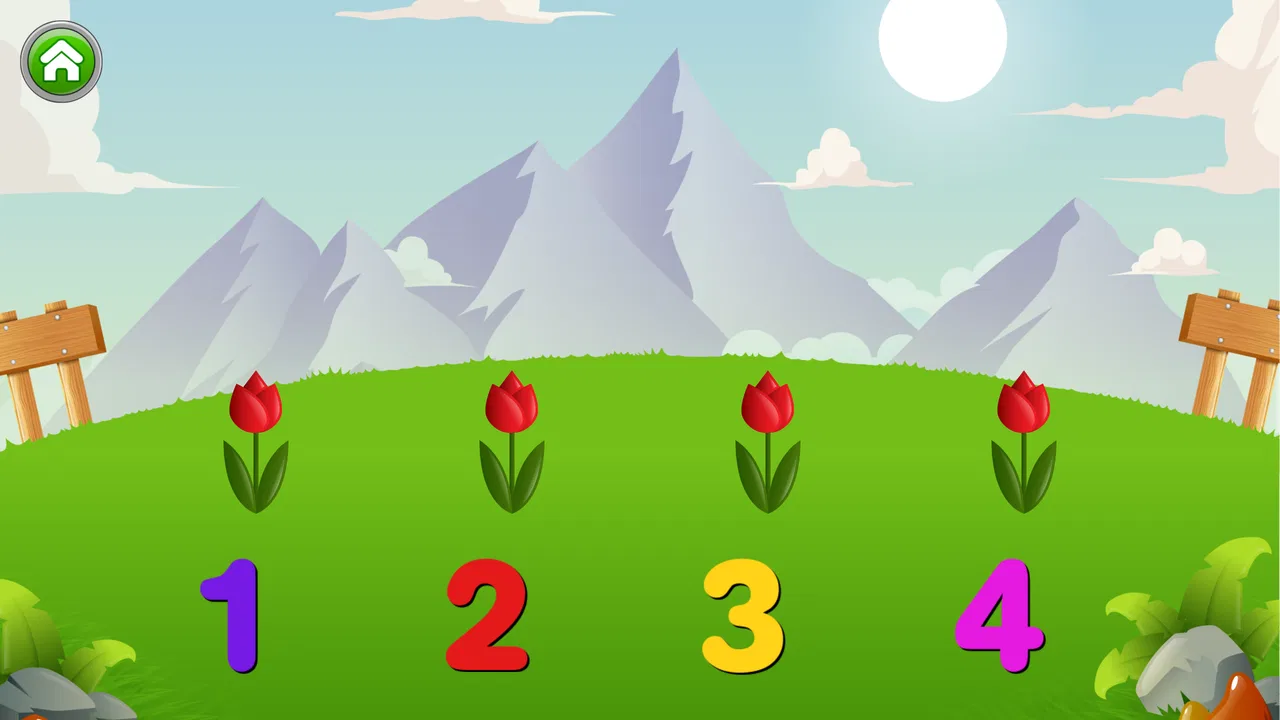
Kids Numbers and Math is an educational app designed to help young children practice early mathematics in a colorful and interactive environment. It generally focuses on recognizing numbers, counting, comparing quantities, and solving simple addition or subtraction exercises. The app is best suited to preschool and early elementary learners, although the ideal age depends on the child’s existing skills and the difficulty level available.
02What math skills can children practice with Kids Numbers and Math?
The app typically introduces foundational skills such as number recognition, counting, ordering numbers, identifying greater or smaller values, and completing basic addition and subtraction problems. Some activities may also support simple logical thinking and number matching. It is most useful as a practice tool alongside adult guidance, rather than as a complete replacement for classroom instruction or a structured mathematics curriculum.
03Is Kids Numbers and Math easy for young children to use independently?
Kids Numbers and Math is built around simple interactions, visual prompts, and short activities intended to make learning approachable for children. Younger users may still need help understanding instructions, choosing the correct activity, or moving between levels. Parents should spend time with the child during the first sessions, then decide whether the child can continue independently based on reading ability, confidence, and familiarity with touch-screen controls.
04Does Kids Numbers and Math contain advertisements, in-app purchases, or require internet access?
Before downloading, parents should review the current store listing because advertising, premium content, and connectivity requirements can vary by version and platform. Some editions of educational apps offer free activities while reserving additional exercises for a paid upgrade. It is also wise to check whether the app works offline and to enable parental controls or purchase restrictions if the device is shared with children.
05Is Kids Numbers and Math safe and appropriate for children?
The app’s child-friendly educational purpose makes it potentially suitable for supervised early learning, but parents should still examine its privacy information, permissions, advertisements, and external links before installation. Avoid granting unnecessary device access, and use the platform’s parental settings to prevent accidental purchases or browsing. Adult involvement is recommended, especially for younger children, to turn the exercises into meaningful learning rather than unsupervised screen time.
Pros
- Covers counting
- addition
- subtraction
- and basic number recognition.
- Simple controls make it suitable for preschool and early learners.
- Bright visuals and playful sounds help maintain children’s attention.
- Short activities work well for quick practice sessions.
- Useful for reinforcing math skills without complicated menus.
Cons
- Some activities may feel repetitive after extended play.
- Older children may outgrow the difficulty level quickly.
- Sound effects can become distracting in quiet environments.
- Limited challenge options may reduce long-term replay value.
- Adult guidance may be needed when children first use the app.

Kids Numbers and Math
Gallery